 by
by AutoForm Training Course: Complete Guide to Sheet Metal Forming Simulation
AutoForm is widely used in the automotive and manufacturing industries for sheet metal forming simulation, stamping process engineering, die design, formability analysis, and manufacturing optimization. Learning AutoForm can help engineers understand how sheet metal components behave during the forming process and identify potential manufacturing problems before physical tooling and production.
START AUTOFORM TRAINING → 🎯 JOIN FREE
An AutoForm training course generally covers the complete sheet metal forming process, starting from CAD data and blank development and progressing through forming simulation, die and binder design, formability evaluation, springback analysis, compensation, and tool validation.
The objective of AutoForm training is not only to learn the software interface but also to understand how simulation results can be used for better process decisions, improved die design, reduced development time, and optimized manufacturing processes.
What Is AutoForm?
AutoForm is a specialized CAE software solution used for sheet metal forming simulation and process engineering. It is particularly relevant to industries where stamped and formed sheet metal components are manufactured, including automotive body, BIW, chassis, structural, and other sheet metal applications.
Using forming simulation, engineers can virtually evaluate the manufacturing process before the actual die is manufactured or production begins.
Depending on the project, simulation can help engineers investigate issues such as:
- Wrinkling
- Splitting and cracking
- Excessive thinning
- Material flow
- Formability problems
- Springback
- Geometrical deviations
- Trimming requirements
- Binder and draw-bead conditions
- Tool and process feasibility
This makes AutoForm training valuable for engineers involved in stamping, press tools, die design, process engineering, CAE, and manufacturing development.
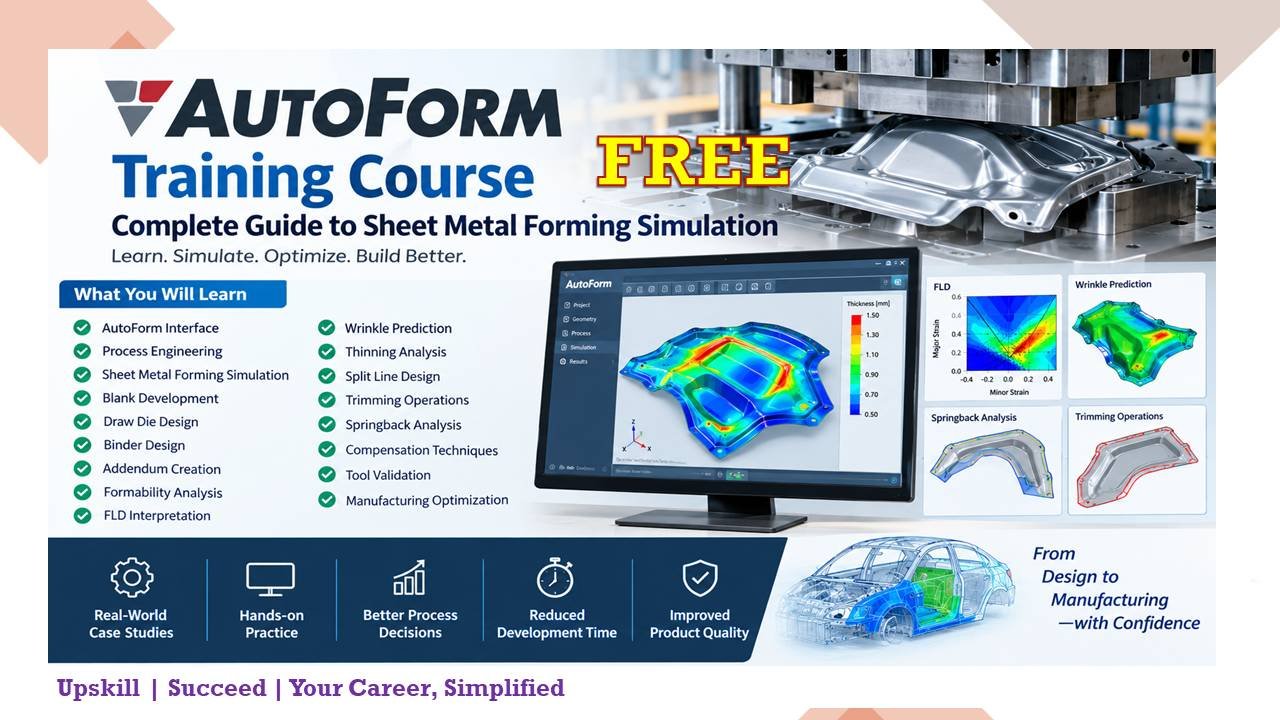
AutoForm Course Overview
A comprehensive AutoForm course normally combines software training with practical sheet metal forming concepts.
The training can cover the complete workflow from importing and preparing geometry to evaluating simulation results and optimizing the manufacturing process.
A typical learning path includes:
- AutoForm software interface
- CAD and geometry preparation
- Process engineering
- Blank development
- Draw die and binder concepts
- Addendum creation
- Forming simulation
- Formability analysis
- FLD interpretation
- Wrinkle and split prediction
- Thinning analysis
- Split-line development
- Trimming operations
- Springback analysis
- Springback compensation
- Tool validation
- Manufacturing optimization
START FREE AUTOFORM TRAINING → CLICK HERE
AutoForm Course Modules
1. AutoForm Interface
The first stage of training is understanding the AutoForm environment and its major tools.
Students learn how to navigate the software, manage projects, import CAD data, create simulation setups, access analysis results, and work with different process parameters.
A good understanding of the interface provides the foundation for more advanced simulation activities.
2. Process Engineering
Process engineering is one of the most important parts of sheet metal forming.
The course introduces the basic concepts required to develop a feasible stamping process, including:
- Forming sequence
- Process planning
- Material selection
- Blank concept
- Tooling requirements
- Binder concepts
- Draw direction
- Forming feasibility
- Trimming strategy
The objective is to understand how engineering decisions affect the final manufacturing result.
3. Sheet Metal Forming Simulation
Forming simulation allows engineers to evaluate the forming process virtually.
Instead of waiting until physical tooling is manufactured, engineers can use simulation to identify potential problems at an early stage.
Training generally covers simulation setup, process definition, material information, forming conditions, simulation execution, and interpretation of results.
4. Blank Development
Blank development is an important step in sheet metal stamping.
The blank must provide sufficient material for forming while minimizing unnecessary material usage.
AutoForm can be used to evaluate material flow and assist engineers in developing suitable blank shapes.
Training may include:
- Initial blank creation
- Blank shape development
- Material utilization
- Blank optimization
- Blank feasibility analysis
5. Draw Die Design
Draw die design plays a major role in the quality of a stamped component.
AutoForm training introduces the simulation aspects of draw-die development, including draw direction, forming conditions, binder behavior, and material flow.
The objective is to identify potential problems before final tooling.
6. Binder Design
The binder controls the sheet during the forming process.
Incorrect binder conditions can contribute to wrinkling, excessive material flow, or other forming problems.
Training helps engineers understand how binder geometry and process conditions influence the forming behavior of sheet metal.
7. Addendum Creation
An addendum is commonly used during the development of stamped sheet metal components to support the forming process.
Training generally covers the principles of addendum creation and how addendum geometry can influence material flow, formability, and die development.
8. Formability Analysis
Formability analysis helps engineers determine whether a component can be manufactured successfully using the proposed forming process.
Typical evaluation areas include:
- Splits
- Wrinkles
- Thinning
- Material flow
- Forming limits
- Surface quality
- Geometrical problems
Simulation results can then be used to modify the process or tooling concept.
9. FLD Interpretation
The Forming Limit Diagram (FLD) is an important tool for evaluating sheet metal formability.
During AutoForm training, engineers can learn how to interpret FLD results and understand different regions associated with safe forming, potential necking, and failure.
Understanding FLD results is important when determining whether a component is likely to experience forming problems.
10. Wrinkle Prediction
Wrinkling is a common issue in sheet metal forming, particularly in areas where compressive stresses and excess material occur.
AutoForm simulation can help predict potential wrinkle locations and evaluate the effect of process changes.
Engineers can investigate parameters such as binder conditions and material flow to improve the forming process.
11. Thinning Analysis
During forming, sheet thickness can change because of material deformation.
Excessive thinning can increase the risk of component failure.
AutoForm training covers how to evaluate thickness distribution and identify areas where excessive thinning may occur.
12. Split-Line Design
Split-line development is an important consideration in die and stamping process development.
Engineers learn how to evaluate component geometry and determine suitable trimming and process strategies.
Proper split-line development can help improve manufacturability and simplify tooling development.
13. Trimming Operations
Trimming removes unwanted material after the forming operation.
AutoForm training can include the simulation and evaluation of trimming operations, helping engineers understand how trimming affects the final component and manufacturing process.
14. Springback Analysis
Springback is one of the major challenges in sheet metal manufacturing.
After a component is removed from the tooling, elastic recovery can cause the component to deviate from its intended geometry.
Springback simulation helps engineers predict these deviations before physical production.
Training can cover:
- Springback prediction
- Springback result evaluation
- Geometrical deviation analysis
- Identification of critical areas
- Process improvement
15. Springback Compensation
After identifying springback, compensation techniques can be used to improve the final component geometry.
Training introduces the basic concepts of compensation and how simulation results can be used to modify tooling or component geometry.
The goal is to achieve the required final geometry after the forming process.
16. Tool Validation
Simulation can be used as part of the tool-validation process.
Engineers can compare expected forming behavior against design requirements and identify potential issues before or during tooling development.
This can help reduce the number of physical trials required during die development.
17. Manufacturing Optimization
The final objective of AutoForm simulation is not simply to produce simulation results.
The results should support better engineering decisions.
Manufacturing optimization may involve improving:
- Material utilization
- Blank shape
- Forming sequence
- Binder conditions
- Addendum design
- Tool geometry
- Trimming strategy
- Springback compensation
- Overall process stability
Practical Projects in AutoForm Training
Practical projects are an important part of learning AutoForm.
A typical training project may start with a CAD component and then proceed through several stages:
CAD Data → Process Planning → Blank Development → Addendum → Binder/Die Setup → Forming Simulation → Result Analysis → Trimming → Springback → Compensation → Final Validation
Working through such projects helps engineers understand how individual simulation activities are connected to the overall stamping process.
Who Should Learn AutoForm?
AutoForm training can be useful for professionals and students interested in sheet metal forming and CAE.
The course is particularly relevant for:
- Tool & Die Engineers
- Stamping Engineers
- Press Tool Designers
- Die Design Engineers
- Process Engineers
- Manufacturing Engineers
- CAE Engineers
- Sheet Metal Engineers
- BIW Engineers
- Automotive Engineers
- Product Development Engineers
- Simulation Engineers
- Tool Room Engineers
- Engineering students interested in automotive manufacturing
Prerequisites for AutoForm Training
A basic understanding of engineering and manufacturing concepts can make AutoForm easier to learn.
Knowledge of the following areas can be beneficial:
- Engineering drawing
- CAD modeling
- Sheet metal manufacturing
- Press working
- Stamping processes
- Tool and die fundamentals
- Material properties
- Manufacturing processes
Advanced programming knowledge is generally not the primary requirement for learning sheet metal forming simulation.
Career Opportunities After AutoForm Training
AutoForm skills can complement experience in automotive manufacturing, tooling, stamping, and CAE.
Depending on experience and educational background, professionals may work in roles such as:
- CAE Engineer
- AutoForm Engineer
- Stamping CAE Engineer
- Tool & Die Engineer
- Die Design Engineer
- Process Engineer
- Sheet Metal Forming Engineer
- Manufacturing Engineer
- BIW Process Engineer
- Tool Validation Engineer
- Simulation Engineer
AutoForm knowledge can be particularly useful when combined with practical experience in press tools, die design, stamping processes, and automotive manufacturing.
Benefits of Learning AutoForm
Learning AutoForm can provide several practical benefits for engineers working with sheet metal forming.
Reduce Physical Trial and Error
Simulation can identify potential forming problems before physical trials, helping engineers reduce unnecessary iterations.
Identify Forming Problems Early
Problems such as splits, wrinkles, excessive thinning, and springback can be investigated during the virtual development stage.
Improve Die Development
Simulation results can support better decisions related to die geometry, binder design, addendum, and process conditions.
Optimize Material Usage
Blank development and material-flow analysis can help engineers work toward improved material utilization.
Improve Product Quality
Understanding forming behavior can help engineers develop more stable manufacturing processes and reduce potential quality problems.
AutoForm Training: From Beginner to Advanced
A structured AutoForm learning program can be divided into three levels.
Beginner Level
The beginner level focuses on:
- AutoForm interface
- Project setup
- CAD import
- Basic process definition
- Material definition
- Basic forming simulation
- Result visualization
Intermediate Level
The intermediate stage can include:
- Blank development
- Binder design
- Addendum creation
- Formability analysis
- FLD interpretation
- Wrinkle analysis
- Thinning analysis
- Trimming
Advanced Level
Advanced training can focus on:
- Springback analysis
- Springback compensation
- Tool validation
- Process optimization
- Complex stamping projects
- Manufacturing problem solving
- Simulation-based die development
AutoForm Course FAQs
What is AutoForm training?
AutoForm training teaches engineers how to use AutoForm software for sheet metal forming simulation, process engineering, formability analysis, die development, springback evaluation, and manufacturing optimization.
Is AutoForm useful for automotive engineers?
Yes. AutoForm is particularly relevant to engineers involved in automotive stamping, BIW, sheet metal components, press tools, die development, and CAE simulation.
Is AutoForm difficult to learn?
The difficulty depends on your previous experience. Engineers with knowledge of sheet metal forming, stamping, die design, and CAD generally have an easier time understanding the simulation workflow.
What topics are covered in an AutoForm course?
A comprehensive course can cover the AutoForm interface, process engineering, blank development, binder design, addendum creation, forming simulation, FLD, wrinkles, thinning, trimming, springback, compensation, tool validation, and manufacturing optimization.
Do I need CAD knowledge before learning AutoForm?
Basic CAD knowledge is highly beneficial because AutoForm projects commonly involve working with component and tooling geometry.
Can AutoForm predict wrinkles and splits?
AutoForm forming simulations can be used to evaluate potential forming problems such as wrinkling, splitting, and excessive thinning.
What is FLD in sheet metal forming?
FLD stands for Forming Limit Diagram. It is used to evaluate the formability of sheet metal and identify areas approaching or exceeding forming limits.
What is springback in sheet metal forming?
Springback is the elastic recovery of sheet metal after forming. It can cause the final component to deviate from its intended geometry.
Can AutoForm be used for springback analysis?
Yes. Springback analysis is an important application of AutoForm and can be used to evaluate geometrical deviations after forming.
Is AutoForm useful for tool and die engineers?
Yes. AutoForm can support tool and die development by allowing engineers to evaluate forming feasibility, material flow, addendum concepts, binder conditions, trimming, springback, and other process-related factors.
Can students learn AutoForm?
Yes. Students with an engineering background and an interest in automotive manufacturing, sheet metal forming, CAE, or tool and die engineering can learn AutoForm.
Final Thoughts
AutoForm training provides an opportunity to develop practical knowledge of sheet metal forming simulation and stamping process engineering. Rather than focusing only on software commands, effective training should connect simulation results with real manufacturing decisions.
From blank development and addendum creation to formability analysis, trimming, springback, compensation, and tool validation, AutoForm can be used throughout different stages of the sheet metal development process.
For engineers working in automotive manufacturing, press tools, die design, stamping, BIW, and CAE, learning AutoForm can be a valuable addition to their technical skill set.
- AutoForm Training
- AutoForm Course
- AutoForm Forming Simulation
- Sheet Metal Forming Simulation
- Stamping Simulation
- Press Tool Design
- Die Design
- Automotive CAE
- BIW Engineering
- Formability Analysis
- Springback Analysis
- Sheet Metal Manufacturing
#AutoForm #AutoFormTraining #AutoFormCourse #AutoFormForming #SheetMetalForming #FormingSimulation #SheetMetalSimulation #StampingSimulation #CAE #CAETraining
START FREE AUTOFORM TRAINING → CLICK HERE